On this page
- Key Takeaways
- What Does "Call Handling" Actually Cover?
- What Is Message Taking, and How Do Messages Reach You?
- Do Answering Service Plans Include Call Transfers?
- What About Appointment Scheduling?
- How Do Escalation and Lead Qualification Work?
- How Much Does an Answering Service Plan Cost in 2026?
- How Do You Choose the Right Answering Service Plan?
- When Does an AI Answering Service Make More Sense?
- Frequently Asked Questions
- Final Thoughts
Many small business answering service plans charge similar-looking monthly rates, yet two plans at the same price can include wildly different work. One might only greet callers and email you a message; another books the appointment, transfers the urgent caller to your cell, and follows an escalation script when something is truly time sensitive. Before you compare quotes, it helps to know exactly what the phrase "call answering" is supposed to buy you.
The short answer: an answering service plan bundles who picks up the phone, what they do with the call, and how the details reach you. Almost every plan covers the first two layers, greeting and message taking. The difference between a cheap plan and a capable one is everything that happens after "hello": transfers, scheduling, qualifying, and escalation.
Call answering: the service of having a live agent or an AI voice agent answer a business's inbound phone calls in the company's name, then handle each call according to a set script, which can mean taking a message, transferring the caller, booking an appointment, qualifying a lead, or escalating an urgent issue to the right person. It is the front-desk layer of a phone system, delivered by an outside provider instead of an in-house receptionist.
Here is what the common features mean, and how they usually split across a basic plan versus a premium tier:
| Feature | What It Means | Basic Tier | Premium Tier |
|---|---|---|---|
| Call handling | An agent or AI answers in your business name using your greeting | Yes, business hours | Yes, 24/7 including nights and weekends |
| Message taking | Caller name, number, and reason captured and sent to you | Yes, by email or text | Yes, with full call summaries and transcripts |
| Call transfer | Warm or cold transfer to your team or cell phone | Often billed per transfer | Usually included |
| Appointment scheduling | Booking, rescheduling, and cancellations into your calendar | Rarely included | Yes, synced to your calendar or CRM |
| Escalation and routing | Urgent calls flagged and dispatched by a defined protocol | No | Yes, with custom rules |
About This Article
- Researched and written: July 2026. Last fact-checked: 2026-07-10.
- Author: Voksha Content Team.
- AI assistance: used for drafting, reviewed and edited by the Voksha Content Team.
- Conflicts of interest: This guide is published by Voksha, which offers an AI receptionist; the feature and pricing descriptions reflect the stated criteria and honest market research, not a paid placement.
- Sponsorship: none.
- Sources: Voksha pricing is from voksha.com/pricing; call-timing figures are from the Voksha After-Hours Economy Report, which publishes its methodology. No competitor prices are quoted. Verify current pricing directly with any provider before you buy.
Key Takeaways
- Small business answering service plans vary widely in price, and what looks like a similar monthly rate can hide very different feature sets.
- Live-agent plans generally scale with call volume and coverage hours, climbing from lean entry tiers to premium 24/7 packages, while AI plans usually run on a lower, more predictable monthly structure.
- Basic plans usually cover greeting and message taking only; appointment booking, escalation routing, bilingual support, and 24/7 live coverage sit in higher tiers.
- Callers who reach voicemail often hang up without leaving a message: 80-85% of voicemail callers hang up, as reported in the Voksha After-Hours Economy Report. What a plan does with a live call matters more than the greeting alone.
- 32% of business calls arrive outside 9-to-5 weekday hours and 23% land on weekends, so after-hours coverage is a real line item, not a nicety (Voksha After-Hours Economy Report, 2026).
- AI answering plans like Voksha bill per call rather than per minute: Starter is $14 a month for 15 calls and Premium $99 for 150 calls, then $1 a call, with no per-transfer fee (Voksha pricing, verified 2026-07-10).
What Does "Call Handling" Actually Cover?
Call handling is the first thing every plan sells, and it is also the most misunderstood. At its simplest, it means a person or an AI voice agent answers your line in your business name, using a greeting you approve, so the caller never hears a generic operator or a voicemail beep. That baseline is worth more than it sounds, because a live answer is what keeps a caller on the line long enough for anything else to happen.
The reason this matters is speed and stickiness. People who hit voicemail often hang up without leaving a message, and about 62% of unanswered callers call a competitor (411 Locals, 2024, as reported in the Voksha After-Hours Economy Report). A plan that only forwards to voicemail after two rings is not really answering your calls. When you read a plan sheet, look for how the greeting is customized, whether the agent can pull up your business details, and how many rings pass before pickup. Those small mechanics decide whether call handling is a real service or a dressed-up voicemail box.
What Is Message Taking, and How Do Messages Reach You?
Message taking is the classic answering service job: the agent captures the caller's name, number, and reason for calling, then relays it to you. Every plan includes some version of this, but the delivery quality varies a lot. A basic plan emails or texts you a short note. A stronger plan sends a structured message with the caller's intent tagged, plus a call summary and sometimes a full transcript, so you are not decoding a scribbled "call back re: pricing" note hours later.
The delivery method is where plans quietly differ. Ask how messages arrive (email, SMS, app, or pushed into your CRM), how fast they land, and whether urgent messages are flagged differently from routine ones. If your team lives in a CRM, a message that drops straight into your pipeline is worth more than one sitting in a shared inbox. Voksha, for example, answers every call and captures it as a lead with a summary so the detail is there later; that is the idea behind not missing calls in the first place: the call is only useful if the details survive it.
Do Answering Service Plans Include Call Transfers?
Sometimes, and this is one of the most common places a "cheap" plan gets expensive. A call transfer means the agent connects the caller to you, a teammate, or an on-call phone instead of just taking a message. There are two flavors: a cold transfer simply routes the call, while a warm transfer means the agent briefs you first ("I have Maria on the line about a burst pipe") so you pick up already knowing the context.
The catch is billing. Many providers list call transfers among the add-on charges rather than bundling them, so every time a call is patched to your cell it can carry a separate fee. If your business runs on live conversations, a plan that meters transfers can cost far more than the sticker suggests. This is also where a plan connects to your existing phone setup. Services that work through call forwarding let the answering layer sit on top of your current business number, so you do not reprint signage or lose your line when a call gets routed back to your team.
What About Appointment Scheduling?
Appointment scheduling is usually the line that separates a basic message-taking plan from a full front-desk plan. Instead of taking a message and letting you play phone tag later, the agent opens your calendar, offers real open slots, and books, reschedules, or cancels on the spot. For a salon, clinic, or home-service business, that single capability turns a phone call into revenue without a callback.
Because scheduling touches your calendar and often your CRM, it tends to live in premium tiers and can carry its own fee on live-agent plans. When you evaluate it, the real questions are integration and accuracy: does the service book into the calendar you already use, does it respect your availability rules and buffers, and does the caller leave with a confirmed time? On its Premium plan, Voksha handles this through appointment booking that books during the call into Google Calendar, Microsoft Outlook, or Apple iCloud (plus Mindbody, Square Appointments and Booker), connectors you set up yourself from the dashboard, while Calendly, HubSpot, and Salesforce are set up with Voksha support, so a booked slot shows up where your team already looks instead of in a separate portal.
How Do Escalation and Lead Qualification Work?
Escalation is the protocol layer, and it is what makes an answering service feel like a trained team rather than a switchboard. Escalation means the agent recognizes a time-sensitive or high-stakes call and follows your rules for it: dispatch an on-call technician for a no-heat emergency, page the attorney for a specific client, or text the owner when a VIP calls. Good plans let you write these rules so the right people are interrupted only when it counts.
Lead qualification is the close cousin of escalation. Before a call is escalated or booked, the agent asks a few screening questions to sort a serious buyer from a tire-kicker or a wrong number. That protects both your calendar and your after-hours sleep. Voksha builds this in through lead qualification: every plan follows your script and captures the caller's details, and on Premium it also routes after-hours emergencies to a human fast and books routine requests. If you want the fuller picture of how these layers fit together, the complete answering service guide walks through the whole stack, and the small business answering service guide narrows it to owner-operator budgets.
How Much Does an Answering Service Plan Cost in 2026?
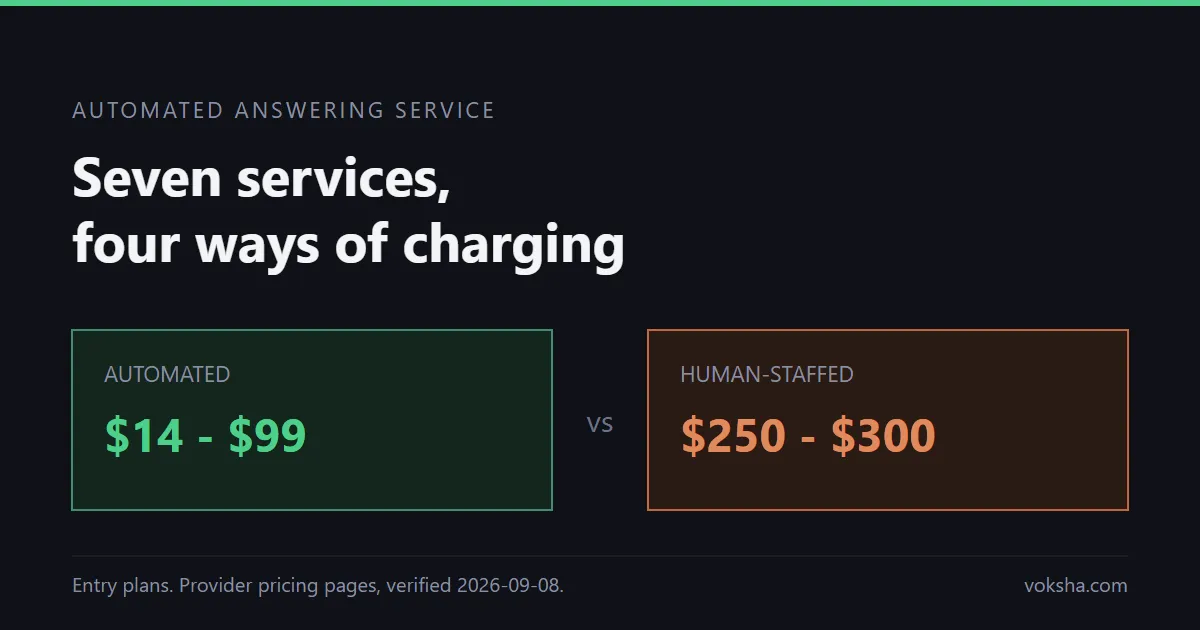
Pricing depends on volume, call length, and how many of the features above you turn on. Live-agent plans generally scale up from lean entry tiers to premium 24/7 coverage, while AI-based plans tend to run on a lower monthly structure. The billing model itself changes the math more than the headline price: a fixed monthly plan, a per-call plan, and a per-minute plan can each land at a very different total for the same call volume, so compare the model, not just the sticker price.
The billing model matters as much as the headline number. Per-minute and per-call plans reward you on slow months but punish you on busy ones, and overage minutes often bill at a steep markup over the base rate. Watch for setup fees, holiday surcharges, and separate charges for transfers, bilingual support, and appointment booking. AI answering services flip that structure toward simpler per-call pricing: Voksha runs $14 a month for Starter (15 calls) and $99 for Premium (150 calls), then $1 a call, with Enterprise from $990 a month and no per-transfer meter (verified against Voksha pricing on 2026-07-10). If you want a side-by-side of the two models, the AI answering service versus live answering service comparison breaks down where each one wins.
How Do You Choose the Right Answering Service Plan?
Start from your calls, not the price sheet. Map when your calls actually arrive, because 32% of business calls come outside weekday business hours and 23% land on weekends (Voksha After-Hours Economy Report, 2026); if a big share of yours are nights and weekends, a business-hours-only plan quietly misses your best leads. Then decide which of the five features you truly need. A solo consultant may only need clean message taking, while a busy clinic needs booking and escalation.
Next, pressure-test the total cost, not the base rate. Add up the add-ons for transfers, scheduling, after-hours, and bilingual coverage, and compare that real number across providers. Finally, check the integrations: a plan that books into your calendar and pushes leads into your CRM saves hours a plan that emails you a note never will. If you handle Spanish-speaking callers, confirm whether multilingual support is included or an upcharge (Voksha covers English on Starter, two languages on Premium, and more on Enterprise), and if after-hours is your pain point, prioritize a plan built for after-hours answering rather than one that treats it as an extra.
When Does an AI Answering Service Make More Sense?
An AI answering service fits best when you want every call answered the same way, around the clock, at a predictable price. Because it does not staff shifts, it answers on the first ring at 2 a.m. as reliably as at 2 p.m., handles booking and qualification without a per-task fee, and forwards from your existing number with no change to your signage. For volume-heavy or after-hours-heavy businesses, that always-on, per-call model usually beats a metered live plan on both cost and consistency.
Human answering services still win in specific cases: highly nuanced conversations, complex judgment calls, or callers who simply prefer a person for sensitive matters. Many businesses end up blending the two, letting AI handle the routine booking and screening while routing edge cases to a human. The honest test is your own call log. If most of your calls are appointments, quotes, and simple routing, an AI receptionist like Voksha covers them: Starter at $14 a month (15 calls) answers and captures caller details, and Premium at $99 (150 calls) adds booking, then $1 a call; if your calls demand heavy human judgment, keep a live team in the loop for those.
Frequently Asked Questions
What is included in a basic answering service plan?
A basic plan almost always includes call handling and message taking: a live agent or AI answers in your business name using your greeting, captures the caller's name, number, and reason for calling, and relays that message to you by email or text. Basic plans usually stop there. Appointment booking, call transfers to your cell, escalation routing, bilingual support, and 24/7 coverage typically require a higher tier or carry separate fees.
Is call answering the same as a virtual receptionist?
They overlap but are not identical. Call answering is the broad function of having someone answer and handle your calls. A virtual receptionist is the more capable version of that role, usually including transfers, appointment scheduling, and lead qualification rather than just message taking. A bare-bones answering service may only take messages, while a virtual receptionist plan behaves more like a remote front desk.
Do answering service plans charge extra for call transfers?
Often, yes. Many live-agent providers list call transfers among their add-on charges, so each time a call is patched to your phone it can carry a separate fee. This is one of the biggest reasons a low base price can balloon on a busy month. AI plans like Voksha's do not meter transfers separately (live transfer is included on Voksha Premium), which makes the monthly cost easier to predict.
How much does a call answering service cost per month?
For live-agent services, monthly cost scales with call volume and coverage hours, climbing from lean entry tiers to premium 24/7 plans. AI answering plans usually run on a lower monthly structure. Voksha charges $14 a month for Starter (15 calls) and $99 for Premium (150 calls), then $1 a call, verified on 2026-07-10.
Can an answering service book appointments into my calendar?
Higher-tier plans can. Appointment scheduling means the agent opens your calendar, offers real open slots, and books, reschedules, or cancels on the call, rather than taking a message for you to follow up on. On live-agent services this usually sits in a premium tier or costs extra. Voksha's Premium plan includes appointment booking during the call into Google Calendar, Microsoft Outlook, and Apple iCloud through self-serve connectors, with Calendly, HubSpot, and Salesforce set up with Voksha support, so the booked slot lands where your team already works.
Final Thoughts
Reading an answering service plan is really about reading past the greeting. Every plan answers the phone; the value is in what happens next, whether the call becomes a booked appointment, a routed emergency, or just another message you have to chase down later. Map your own call patterns, decide which of the five layers you actually need, and add up the true cost including the add-ons before you sign. If you want every call answered 24/7 at a predictable per-call price, with booking and routing on the Premium plan, get started with Voksha: every plan comes with a free demo call and a 7-day money-back guarantee.