On this page
ROI on an AI receptionist comes down to five measurable numbers: call answer rate, cost per booked appointment, missed-call recovery rate, payback period, and escalation rate. Track these against a baseline from before you switched on the system, using your own call logs and average deal value, not an industry-wide average. Anyone selling you a single blended "ROI percentage" without those five inputs is skipping the math.
This guide is for the owner or office manager who has an AI receptionist running, or is about to launch one, and wants to know whether it's actually paying for itself. It gives you the formula for each metric, what data you need to calculate it, and how often to check it. For the broader cost-versus-human comparison, see AI Receptionist vs. Human: Cost & ROI Breakdown; this guide focuses specifically on the ongoing metrics you track after you've made that decision.
Key Takeaways
- ROI on a phone system is a function of five metrics, not one: answer rate, cost per booked appointment, missed-call recovery rate, payback period, and escalation rate.
- Every formula in this guide uses your own numbers. There is no universal "average ROI" that applies to every business's call volume and deal size.
- Cost per call is the easiest metric to calculate: your monthly plan cost divided by total calls handled, including overage.
- Payback period compares your monthly system cost against the value of the extra bookings it captures, using your own average appointment or deal value.
- A rising escalation rate isn't automatically bad. It can mean the system is correctly routing complex calls to a human instead of mishandling them.
- Measure before and after. Without a baseline from your prior setup (voicemail, an answering service, or no coverage at all), "ROI" is a guess.
The metrics that actually measure ROI
Most ROI conversations skip straight to a dollar figure, which hides where the value (or the cost) is actually coming from. These five metrics separate the pieces:
| Metric | What it tells you | How often to check |
|---|---|---|
| Call answer rate | Are calls actually being picked up | Weekly |
| Cost per booked appointment | What each conversion actually costs | Monthly |
| Missed-call recovery rate | How many previously lost calls now convert | Monthly |
| Payback period | How long until the system pays for itself | Once, then quarterly |
| Escalation rate | How often the AI hands off to a human, and why | Monthly |
Call answer rate: your starting baseline
Before you can claim any ROI, you need to know your starting point. Call answer rate is the percentage of inbound calls that get a real response, whether from a person, an answering service, or an AI receptionist, as opposed to going to voicemail or ringing out.
Formula: (Calls answered ÷ Total inbound calls) × 100
Pull this number from your phone system's call logs for the month before you added an AI receptionist, then again for the month after. Most small businesses without dedicated after-hours coverage will see this number rise sharply once every call gets an immediate response, since an AI receptionist answers around the clock rather than only during staffed hours. The size of that increase depends entirely on how many of your calls previously came in outside business hours or during busy periods, so pull your own numbers rather than assuming a fixed percentage gain.
Cost per booked appointment
This is the cleanest single number for comparing an AI receptionist to any other front-desk option, because it ties spend directly to a business outcome rather than to call volume alone.
Formula: Total monthly system cost ÷ Number of appointments booked through the system
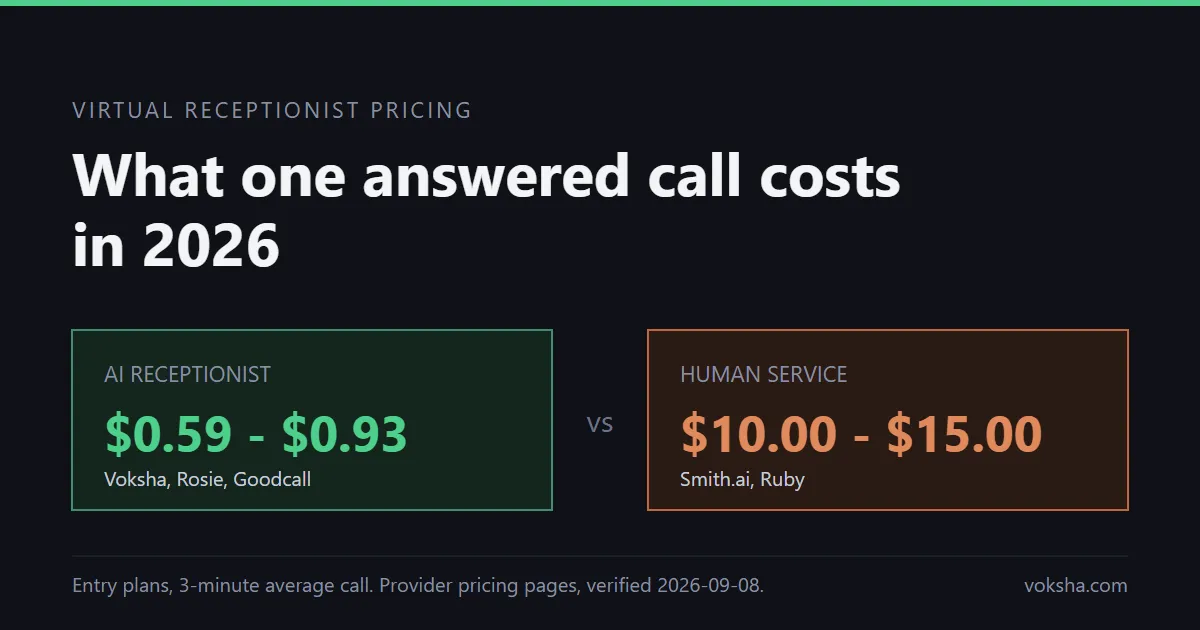
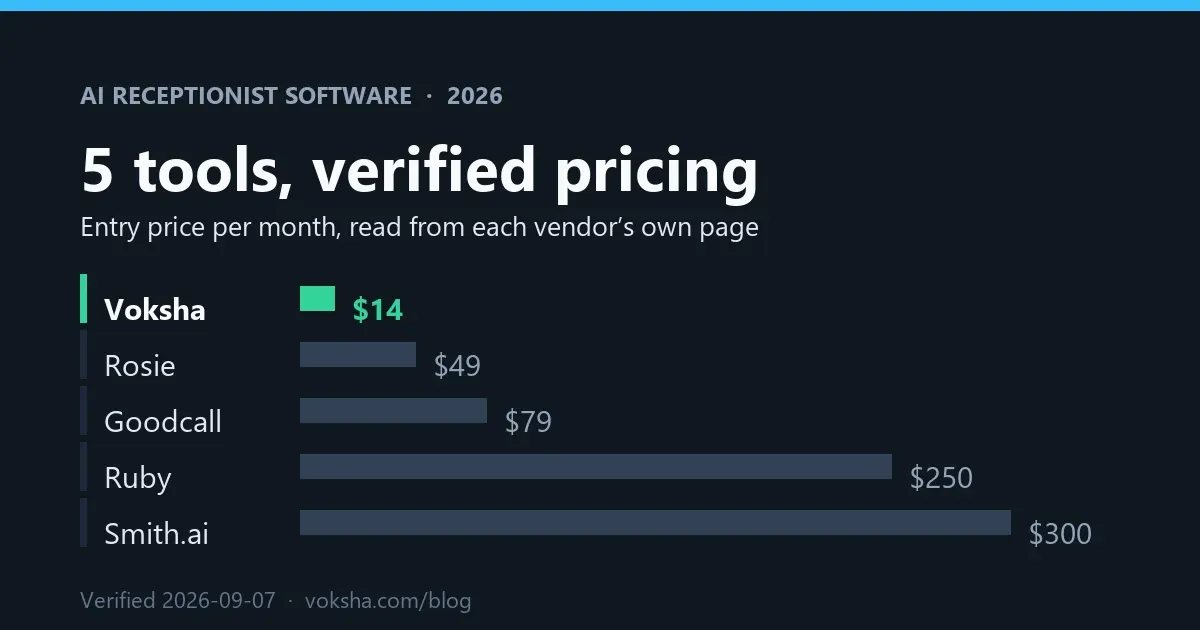
Under Voksha's published pricing, the Starter plan is $14/month for 15 calls, then $1 per additional call, and Premium is $99/month for 150 calls, then $1 per additional call. Booking during the call is on Premium; on Starter, which answers and captures the caller's details, count the bookings you make from those captured leads. If your business handles 150 calls a month on Premium and 40 of them convert into a booked appointment, the cost per booked appointment is $99 ÷ 40 = $2.48. If call volume rises to 300 calls with the same 40 bookings, cost per booked appointment becomes ($99 + 150 overage calls × $1) ÷ 40 = $6.23. Tracking this monthly shows you whether rising call volume is translating into more bookings or just more calls.
Missed-call recovery rate
This metric isolates the specific value an AI receptionist adds over a setup where some calls simply go unanswered: how many of the calls that would have been missed are now captured and converted.
Formula: (Bookings from calls outside prior staffed hours ÷ Total calls outside prior staffed hours) × 100
To calculate this, you need your prior call logs showing how many calls came in when no one was available to answer (after hours, lunch breaks, when the line was busy). Compare that volume and its historical conversion rate, if you tracked one, against what the AI receptionist captures in the same windows now. If you didn't track missed-call outcomes before, start now: even a rough one-month baseline going forward gives you a number to improve against next quarter. Voksha's missed call recovery page covers how that after-hours capture works.
Payback period: when does it pay for itself
Payback period answers the question owners actually care about: how long until the system has paid for its own cost in captured revenue.
Formula: Monthly system cost ÷ (Additional bookings per month × Average value per booking)
Plug in your own average appointment or deal value here; there is no universal figure that applies across law firms, salons, HVAC companies and medical practices. As an illustration only: a business on the $99/month Premium plan that books 10 additional appointments a month it wouldn't have captured before, at an average value of $150 each, reaches payback in $99 ÷ ($1,500 in additional monthly value) which is a fraction of a month. A business with a lower per-appointment value or fewer additional bookings will see a longer payback period, which is exactly why this needs your own numbers rather than a marketing claim. Voksha's ROI calculator walks through this same formula with your own inputs.
Escalation rate and call quality
Cost metrics alone can hide a quality problem. Escalation rate, the share of calls the AI hands off to a human, tells you whether the system is drawing the line correctly between what it should handle and what needs a person.
Formula: (Calls escalated to a human ÷ Total calls handled) × 100
A very low escalation rate isn't automatically good; it can mean the system is trying to handle calls it shouldn't, including calls that need human judgment, empathy, or a decision the AI isn't authorized to make. A rising escalation rate isn't automatically bad either; it can mean more complex or high-value calls are reaching the system in the first place. Read this metric alongside call transcripts or summaries, not as a number in isolation, and check it against the escalation triggers you configured (see Top 5 AI Receptionist Mistakes That Drive Callers Away for how those triggers should be set).
How This Guide Was Sourced
Written by the Voksha team. Voksha builds AI receptionists for small businesses, and the pricing figures used in the worked examples above are Voksha's own published rates. The formulas in this guide are standard cost-accounting and conversion-rate calculations applied to phone system data; they don't require an external statistic to be correct, since they run on each business's own call logs and deal values. No Voksha call data is used in this guide beyond the publicly listed pricing structure. Every other figure above is a formula you apply with your own numbers.
Frequently Asked Questions
What's a "good" cost per booked appointment?
There isn't a universal benchmark. Compare your own number over time, and against what a booking cost you under your prior setup (a receptionist's fully loaded wage, or a live answering service's per-minute rate), not against another business's industry.
How long should I wait before measuring ROI?
Give the system at least a full billing cycle, ideally two, before drawing conclusions. Call patterns vary week to week, and a single busy or slow week will skew any of these five metrics.
Do I need special software to track these metrics?
No. Every formula here runs on data most phone systems and calendars already log: total calls, calls answered, appointments booked, and calls escalated. A simple spreadsheet updated monthly is enough for most small businesses.
What if my payback period looks bad?
Check which input is dragging on the number: low additional booking volume, a low average deal value, or a plan tier mismatched to your call volume. Often the fix is adjusting the plan or call-routing configuration rather than concluding the system doesn't work.
Should every business track all five metrics?
Call answer rate and cost per booked appointment are useful for almost any business from day one. Missed-call recovery rate matters most if you previously had real coverage gaps. Escalation rate matters more for businesses with a mix of routine and complex calls, like law firms or medical practices.
Conclusion
ROI on an AI receptionist isn't a single number you can look up. It's five measurements you calculate from your own call logs, tracked consistently over time. Start with call answer rate and cost per booked appointment in month one, add the rest as you build a baseline. See Voksha's pricing to check which plan fits your call volume before you start measuring.