

What it says
How to write your agent's instructions so it answers like your best receptionist and stops where it should.
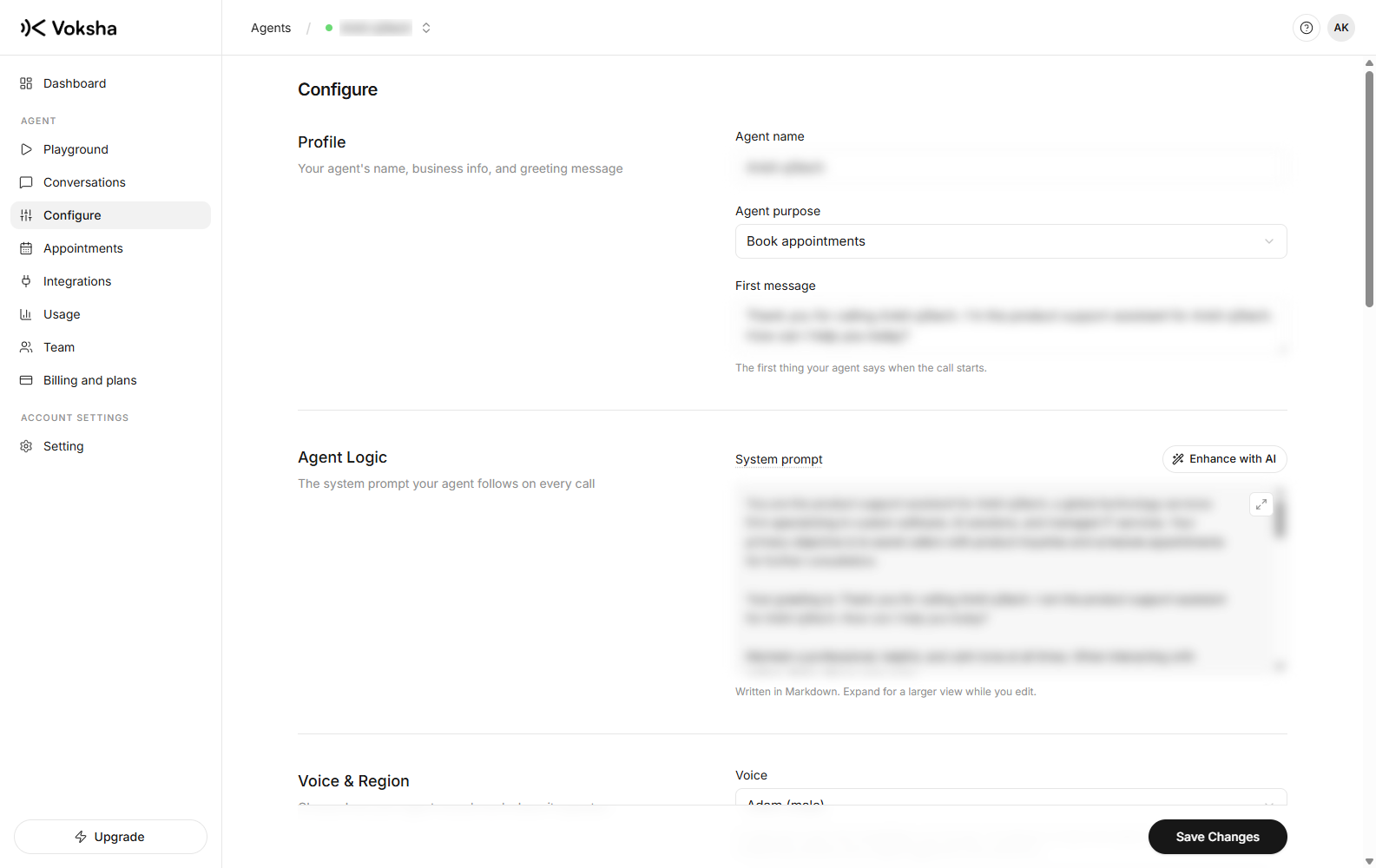
The dashboard calls this the System prompt, under Agent Logic on the Configure page. It is the single biggest lever you have.
Plain language, written in Markdown, yours to edit, and saving it publishes to the live agent.
Where to find it
Dashboard → Agents → open the agent → Configure.
Set the purpose first
Above the prompt, under Profile, is Agent purpose. It is a dropdown, and it frames everything the agent does before your prompt says a word.
| Purpose | The agent's job on the call |
|---|---|
| Book appointments | Schedule the caller, or collect the times that suit them |
| Answer common questions | Handle questions about services, availability and next steps |
| Capture new leads | Collect enough for you to follow up |
| Route urgent calls | Spot an urgent situation and act on it |
| Act like a receptionist | Greet, triage, take a message |
| Custom | For an agent set up by hand rather than by the wizard |
Pick the one that matches what you actually want from the call. An agent set to answer questions will not push for a booking, and one set to book will keep steering back to a time.
How to structure the prompt
A prompt written as one long paragraph is the most common reason an agent answers badly. The model reads headings, and it follows a structured prompt far more reliably than a wall of text.
Use these six headings, in this order. Write them as Markdown headings, because the prompt field is Markdown.
| Heading | What goes under it | Who writes it |
|---|---|---|
# Personality | Who the agent is. Its name, who it works for, its manner | You |
# Environment | Where it is. On the phone, to a caller who may be driving or in a hurry | You |
# Tone | How it speaks. Length of answers, formality, whether it uses contractions | You |
# Goal | What the call is for, and the order to do things in | You, guided by Agent purpose |
# Guardrails | What it must never do. The most important block on this list | You |
# Tools | What it can do beyond talking | The dashboard, automatically |
Guardrails carries the most weight. Put every hard rule under that one heading rather than scattering rules through the others. Anything you absolutely cannot have the agent say belongs there and nowhere else.
What the dashboard already handles
Four things are wired for you. Writing them into the prompt as well is wasted effort at best, and at worst it contradicts what the dashboard sends.
| Handled for you | Set where | So do not |
|---|---|---|
| Booking tools | Connecting a diary under Integrations | Describe how to check availability or make a booking. The tools are attached from the connector, and reattached every time you save |
| The greeting | First message on Configure | Repeat the opening line in the prompt |
| The voice | Voice on Configure | Describe the accent or gender you want |
| Collected details | Call Details on Configure | List the fields to capture. They are sent as their own settings, not as prompt text |
What is still worth writing under # Tools is the judgement, not the mechanics: when to transfer, when to book rather than take a message, what counts as urgent enough to interrupt. The dashboard gives the agent the ability. You tell it when to use it.
A template to start from
Copy this, replace the details with yours, and delete what does not apply.
# Personality
You are Sam, the receptionist for Bright Smile Dental, a family dental
practice in Leeds. You are warm, unhurried and efficient.

# Environment
You are on a phone call. The caller cannot see anything, may be driving,
and may be calling about something painful. They cannot re-read what you
said, so say it once and say it clearly.

# Tone
Keep answers to one or two sentences, then ask what else they need.
Use everyday words, not dental terms. Use contractions. Never read out a
list of more than three things.
Write numbers, prices and times as words: say "sixty pounds" and
"half past two", not "£60" and "14:30".

# Goal
1. Greet the caller and find out what they need.
2. If they want an appointment, offer the earliest two times that suit them
   and book it.
3. If they want a price, give the range and say what decides it.
4. Before ending, confirm their name and number, reading the number back
   one digit at a time.

# Guardrails
Never give clinical or medical advice. If asked, say a dentist will advise
at the appointment.
Never promise a specific dentist unless the caller asks for one by name and
that dentist is available.
Never quote a fixed price for treatment. Give the range only.
If you do not know something, say you do not know and offer to take a
message. Do not guess. This step is important.
Never repeat back card details or discuss payment over the phone.

# Tools
Booking is already wired up, so this block is only about when to use it.
Offer to book whenever the caller describes a problem that needs a visit.
If they only want a price, answer and do not push for a booking.
Transfer the call immediately if the caller says the word emergency, or
mentions bleeding that will not stop.
The rules that matter most
Five things carry most of the difference between a good agent and a poor one.
- Cap the length. "Keep answers to one or two sentences" belongs in every prompt. Without it the agent delivers paragraphs, and paragraphs on a phone call are where callers hang up.
- Tell it to admit what it does not know. An agent with no instruction here invents an answer, confidently. "If you do not know, say so and offer to take a message" is the single highest-value line you can write.
- Spell out numbers and symbols as words. The agent speaks what it writes.
£60and9-5come out wrong; "sixty pounds" and "nine to five" come out right. - Put the hard rules under Guardrails. A rule buried in a paragraph about tone gets treated like a preference. Under Guardrails it gets treated like a rule.
- Say what the caller's situation is. The Environment block sounds redundant and is not. An agent that knows the caller may be driving and cannot re-read anything behaves differently from one that does not.
Mark the rule you cannot afford to lose. Adding This step is important after a line in Guardrails measurably increases how reliably it is followed. Use it two or three times, not ten, or it stops meaning anything.
Write for the ear, not the eye
This is the part that separates an agent that sounds right from one that sounds like a website being read aloud. Your prompt is followed by something that speaks, and speech has rules a page does not.
| Write this | Not this | Why |
|---|---|---|
| "Callout is sixty pounds, and that covers the first hour" | "Callout: £60 (incl. 1st hr)" | It reads symbols and abbreviations literally, or awkwardly |
| "We are open nine to five, Monday to Friday" | "Hours: 9-5 M-F" | A caller hears a sentence, not a table |
| "Ask for their postcode, then confirm it back to them" | "Collect postcode" | Say the behaviour you want, including the confirming |
| "Keep answers to a sentence or two" | (nothing) | Without this it will happily deliver a paragraph |
Five habits that do most of the work:
- Say how long answers should be. "Answer in one or two sentences, then ask what else they need." Length is the single most common complaint, and one line fixes it.
- Spell hard words phonetically. Your business name, a street, a treatment. Write
Cholmondeley (say "Chumley")and it says it right. - Give it the exact words for the awkward moments. What to say when it does not know, when the caller is angry, when the price cannot be quoted. Left blank, it improvises.
- Tell it to confirm anything it will act on. Numbers, dates, spellings. "Read the phone number back one digit at a time" prevents most bad callbacks.
- Write one instruction per line. Long paragraphs bury the rule you cared about, in a prompt exactly as in an email.
Read your prompt out loud before saving. If you stumble over it, so will the agent. It is a ten second test that catches more than rereading it silently ever does.
Write a briefing, not a script
You are not writing the words it must say. You are telling it what it needs to know, the way you would brief a new receptionist on their first morning. It handles the phrasing.
| Cover this | Because |
|---|---|
| What you do, in your customers' words | Callers do not use industry terms |
| Your hours, including the days you are closed | Otherwise it guesses |
| What things cost, or that you cannot quote | Silence is where invention happens |
| What you do not do | The most valuable lines in the whole thing |
| The two questions everybody asks | They are most of your calls |
| How to say your business name | If it gets mispronounced |
| What counts as urgent | So the right calls get through |
Say what you do not do
An agent with no instruction about something will try to be helpful, and helpful invented answers cost you money.
We offer plumbing services in the local area.We do domestic plumbing in Leeds and Bradford only. We do not do gas work,
commercial contracts, or emergency callouts after 8pm. We cannot give a fixed
price over the phone: every job is quoted after a visit, and the visit is free.The second one stops a caller in Manchester being promised a visit, and stops the agent guessing a price.
Prices and promises
If prices vary, say that they vary and what decides them.
| Line | Safe |
|---|---|
| "Callout is £60 including the first hour, parts extra" | Yes |
| "Around £50 to £150 depending on the job" | Yes |
| Nothing at all about price | No. Silence is where invention happens |
Handoff
You chose what happens when a call needs a person during setup. The options were:
| Setting | What the caller gets |
|---|---|
| Take a message | It collects the reason for the call and passes it on |
| Collect callback details | It asks for contact details and the best time to call back |
| Tell them a human will follow up | It sets the expectation that somebody will respond later |
| I'm not sure yet | A safe fallback that takes a message |
Reinforce that choice here with the cases that matter:
If the caller says the word emergency, or mentions water coming through a
ceiling, transfer immediately without asking more questions.
Enhance with AI
There is an Enhance with AI button above the prompt. It rewrites what you have written into a fuller prompt. Read the result before you save it: it expands on your words, so anything you left vague it will fill in with a guess.
After you save
Saving publishes to the live agent, so the next call uses the new instructions. Make a test call and ask the exact question you were worried about. Two minutes, and it is the only way to know it took.
Fix from real calls, not from imagination. Read a week of transcripts and you will find the three questions you never thought of. Those three sentences improve the agent more than an afternoon of polishing.