

Collected details
Choose the details your agent captures from every call, so they arrive as fields rather than buried in a transcript.
Every call gives you a recording, a transcript and a summary. Collected details go further: you name what you want from every call, and it comes back as fields you can read at a glance.
Where to find it
Dashboard → Agents → open the agent → Configure.
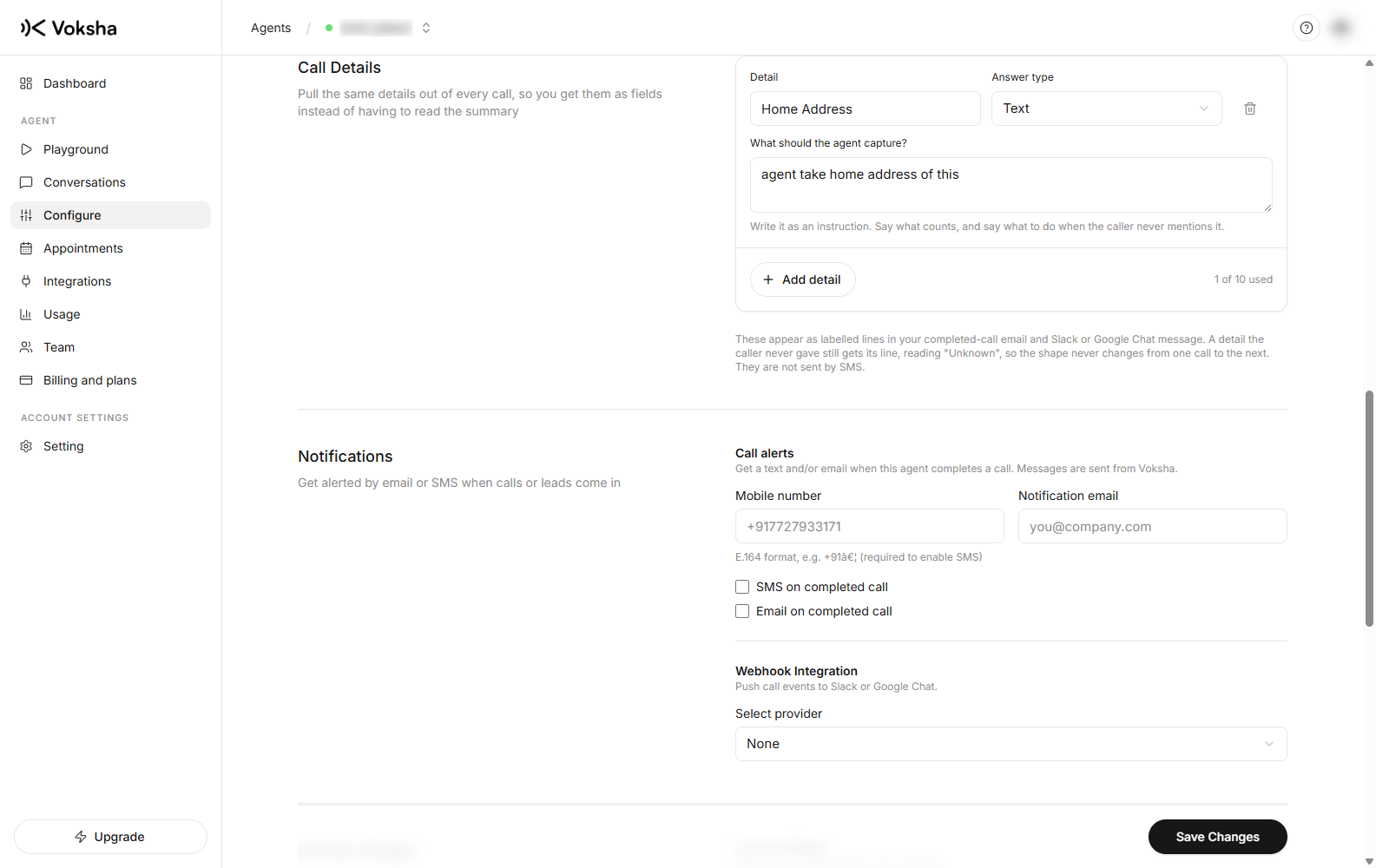
The three parts of a detail
Each row you add has three parts, and the third is the one people skip.
| Field | What it is | Example |
|---|---|---|
| Detail | The label you will read later | Home Address |
| Answer type | The shape of the value | Text |
| What should the agent capture? | An instruction, written to the agent | "Ask for the full address including postcode. If they only give a street, ask for the postcode too." |
Write the third one as an instruction, not a question. Say what counts as a good answer, and say what to do when the caller never mentions it. A detail with a vague instruction comes back vague.
Answer types
| Type | Use it for | Comes back as |
|---|---|---|
| Text | Names, addresses, free description | Words |
| Yes or no | Existing customer, has a referral, wants a callback | Yes or no |
| Whole number | Number of people, number of rooms | A whole number |
| Number | Anything with decimals, like a measurement | A number |
Picking the right type matters because it decides what you can sort and filter on later. "How many people" as Text gives you "about four"; as Whole number it gives you 4.
You can add up to 10 details per agent. The editor shows how many you have used.
What to collect
Ask for what you would otherwise have to listen back for.
| Field | Why it earns its place |
|---|---|
| Name and phone number | For calls that do not end in a booking |
| What they wanted, in a few words | Triage without opening the call |
| Address or postcode | If you travel to customers |
| Urgency | This morning's list sorts itself |
| How they heard about you | The cheapest marketing report you will ever run |
How it behaves on the call
The agent works these into the conversation rather than reading them out as a form. It will not interrogate a caller who is trying to leave. If somebody hangs up early you get what was captured before that, and the field is simply empty.
An empty field is not a failure. A caller who refuses to give a surname is a caller you still want to ring back.
Where they show up
- On the call in Calls, alongside the summary
- In the notification sent to your email, Slack or Google Chat
That is what makes a morning triage possible without opening a single recording.
Changing them
Editing the fields applies to future calls. Calls already recorded keep what they captured, because inventing a value for a question nobody asked would be worse than an empty column.
Keep it to a handful. Every extra field is another thing the agent tries to work into a two minute conversation. Four well chosen ones beat ten that make the call feel like a survey.