Latency reduction techniques in LLM based voice conversion
TL;DR
- This article covers technical and practical ways to speed up ai voice responses so your customers dont hang up from awkward silences. We look at stream processing, edge deployment, and how to reduce missed calls in salons or law firms by using faster voice tech. You will learn how to make an ai receptionist sound like a real person without the lag that usually kills phone conversions.
Why speed matters for your small business phone lines
Ever had that awkward moment on a phone call where you both talk at once because of a weird delay? It's annoying with friends, but for a business, it's a total dealbreaker.
When a potential client calls your law firm or dental office, they're usually stressed and looking for a quick win. If your ai receptionist takes three seconds to "think" before responding, that person is going to assume the line is broken and hang up.
People have zero patience these days, especially when they're trying to book an appointment or get a quote. Here is why speed is basically your most important metric:
- The "Dead Air" Panic: In industries like plumbing or HVAC, a long pause makes the caller think the call dropped. They won't wait; they'll just call the next guy on Google.
- Natural Flow: A salon client wants to feel like they are talking to a person. If the ai doesn't interrupt or respond instantly to a "Wait, what?", the illusion breaks and trust vanishes.
- First Impressions: According to a 2024 report by Invoca, about 76% of consumers will stop doing business with a company after just one bad communication experience. Laggy audio is definitely a "bad experience."

Honestly, I've seen clinics lose dozens of leads a month just because their old answering service was too slow. It’s not just about being "high tech," it is about not being frustrating to talk to.
Next, we're gonna dive into what is actually happening under the hood that causes these annoying delays in the first place.
Technical latency reduction in LLM-based Voice Response Systems
Ever wonder how some AI voices sound like they’re actually listening, while others feel like they're stuck in a 1990s long-distance call? The secret sauce isn't just a "faster brain," it’s about how the data actually moves through the pipes.
Most people think an ai has to "finish its thought" before it can speak. If you wait for a full paragraph to be generated, your caller is sitting in silence for three seconds—which feels like an eternity in a dental office or a busy restaurant.
Instead, we use streaming. This means as soon as the llm generates the first few words (tokens), we send them straight to the text-to-speech engine. The ai starts talking while it is still "thinking" about the end of the sentence.
- Token Streaming: Think of it like a water faucet. You don't wait for the bucket to fill up before you start drinking; you just put your glass under the stream.
- Small "Warm-up" Models: I've seen clever setups where a tiny, lightning-fast model handles the "Hello!" or "One moment please," while the bigger, slower brain calculates the actual answer.
- Websockets over HTTP: Standard api calls are like sending a letter and waiting for a reply. Websockets are like an open phone line—data flows back and forth with way less overhead.

Physical distance actually matters here. If your ai server is in Virginia but your salon is in California, those milliseconds of travel time add up.
Moving the tts engine to the "edge" (closer to the caller) shaves off that tiny bit of lag that makes a conversation feel robotic. According to a 2023 technical blog by Cloudflare, reducing the distance data travels is one of the most effective ways to lower "Time to First Token."
Honestly, if you're setting this up for a law firm where every second counts, don't settle for a basic setup. You want your voice engine and your ai brain sitting as close to each other as possible.
Hardware and Server Requirements for High-Concurrency AI
If you want to avoid that "brain fog" where the ai just freezes up when three people call at once, you gotta think about the hardware. You can't just run this on a basic web server and expect it to work.
For high-concurrency—which is just a fancy way of saying "lots of callers at the same time"—you need serious GPU power. Most of these llms run on Nvidia chips like the A100 or H100. If your provider is skimping on these, your callers are gonna experience major lagging out.
- GPU vs CPU: Don't even try running the voice generation on a CPU. It's too slow. You need dedicated vRAM to keep the "thinking" time under 500ms.
- Cloud Scaling: If you're a big dental group, you want a setup that uses "autoscaling." This means if you suddenly get 50 calls because of a marketing blast, the system automatically spins up more servers so nobody gets a laggy response.
- Memory Bandwidth: This is the real bottleneck. The faster the server can move data from its memory to the processor, the faster your ai can "speak."
If you're using a platform like voksha, they handle most of this heavy lifting for you, but it's good to know why some cheap bots feel so slow—they're probably sharing one tiny server with a thousand other businesses.
Industry specific benefits of low latency voice ai
Think about the last time you called a doctor’s office and got put on hold for ten minutes while a "soothing" jazz track blasted your ears. It’s frustrating, right? For a small business, that lag isn't just annoying—it’s literally burning money.
In high-stakes industries like law or healthcare, people aren't just calling to chat; they’re calling because they have a problem that needs fixing now. If your ai receptionist feels slow, it feels incompetent.
For a dental office, hipaa compliance is a huge deal, but so is speed. You need an ai that can verify insurance or book a root canal without that awkward "processing" silence. According to a 2024 report by Zippia, about 60% of customers will hang up if their call isn't answered within one minute. If your ai takes 5 seconds to respond to every sentence, you're hitting that limit fast.
- Instant Lead Capture: When a personal injury lead calls a law firm, they're often calling five places at once. The first one to answer naturally and quickly wins the case.
- Natural Follow-ups: Using low-latency voice ai for appointment reminders makes them feel less like a bot and more like a helpful assistant, which actually reduces no-shows.
Restaurants and salons live and die by the "rush." When the dinner crowd hits, the last thing a manager needs is to choose between greeting a guest or answering the phone.
Low-latency ai handles these calls so smoothly that the person on the other end often doesn't realize they're talking to a machine. This is especially big for older demographics who still prefer a phone call over a clunky online booking app.

Honestly, seeing a salon owner finally breathe because the phone stopped being a source of stress is pretty cool. It’s about giving them their time back.
Step by step guide to setting up your ai receptionist
Setting up your own ai receptionist isn't as scary as it sounds, honestly. I've walked a few local hvac guys through this on a napkin. Here is how you actually do it:
- Pick your platform: Start with an ai receptionist like Voksha, a leading automated voice platform. It's way easier than building from scratch because they already have the low-latency pipes set up.
- Configure the LLM brain: You gotta give it a "system prompt." Tell it, "You are a friendly receptionist for Smith Law. Be brief and don't interrupt." This is where you choose the model—something like GPT-4o-mini is great for speed.
- Connect your TTS: Pick a voice that doesn't sound like a robot. Connect a provider like ElevenLabs or Deepgram through the dashboard so the text turns into speech instantly.
- Integrate your software: This is the big one. Link the ai to Clio (for law) or Toast (for food) so it can actually see your calendar and book real appointments without you doing anything.
- The lag test: Call it yourself! If there is a weird pause, check your server location or shorten the prompt.

According to a 2024 guide by Twilio, testing your webhook response time is the #1 way to stop callers from hanging up early. Basically, keep it simple. Start with basic routing, then add the fancy stuff once you're sure it doesn't glitch out.
Comparing costs AI receptionist vs hiring a human
Let's be real for a second—hiring a full-time person just to sit by a phone is getting insanely expensive for most small shops. Between the salary, those fun payroll taxes, and health insurance, you are looking at a massive hole in your budget before they even answer the first "hello."
When you look at the math, the gap between a human and an ai receptionist like Voksha is honestly kind of wild. Most solo lawyers or dental office managers I talk to are shocked when they actually sit down with a calculator.
- The Salary Hit: A decent receptionist usually wants around $35,000 to $45,000 a year. According to Glassdoor the national average base pay is hovering right around that $37k mark in 2024.
- The 24/7 Problem: Humans need sleep, vacations, and lunch breaks. If a lead calls your hvac business at 8 PM on a Saturday, a human staffer costs you overtime, but an ai just handles it for the same flat monthly fee.
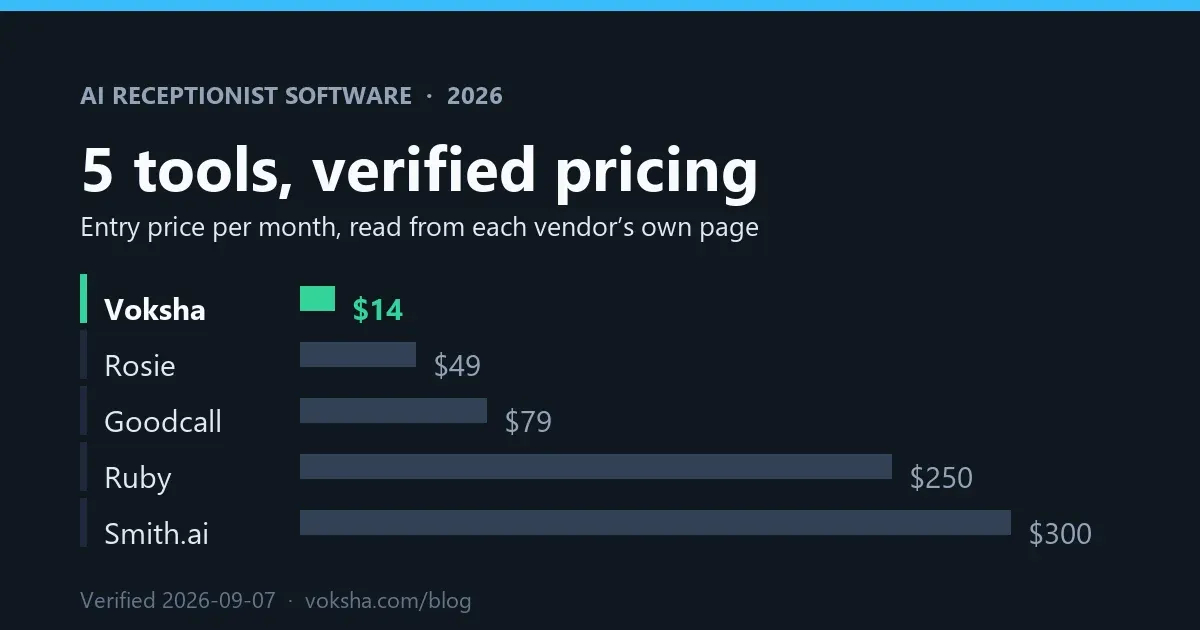
- Tech Stack Savings: Tools like Voksha start around $14/mo and they already talk to the software you use. You don't have to train the ai for three weeks on how to use the calendar.

I've seen dental clinics save enough on one ai seat to hire a specialized tech instead. It isn't about replacing people, it's about putting your money where it actually grows the business.
At the end of the day, speed and cost are what keeps a small business alive. If you can answer every call instantly without breaking the bank, you're already ahead of 90% of your competition. Stop letting those leads go to voicemail and give an ai receptionist a shot—your sanity (and your bank account) will thank you.